Digital Twin

Your factory in 3D, live from MQTT

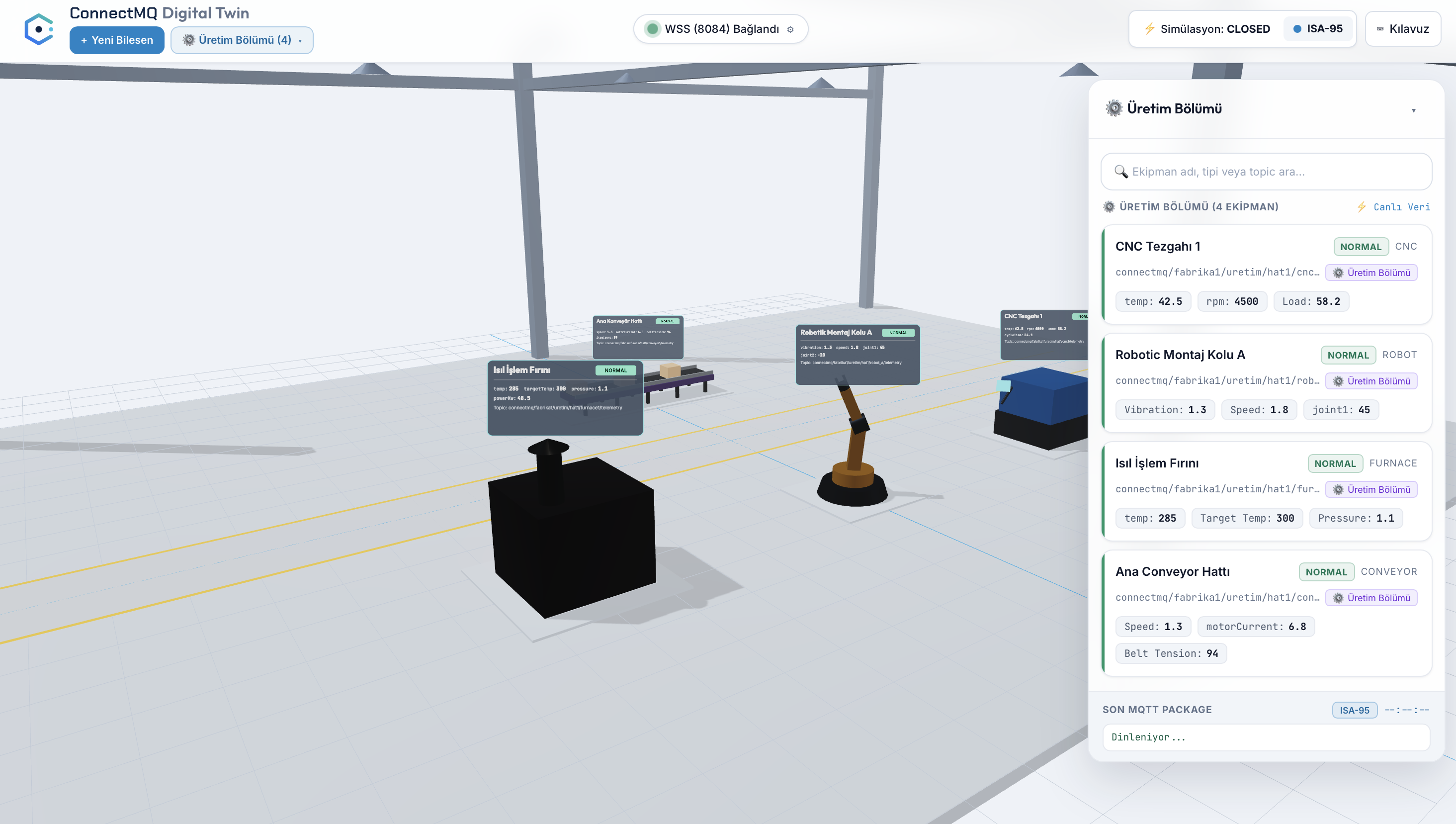
The Digital Twin places CNC machines, robots, furnaces and conveyors in a 3D model of your site and binds each one to its MQTT topic, so telemetry and status appear right on the equipment.

No card required

Digital Twin

See your factory in 3D, live

The Digital Twin places machines in a 3D model of your site and binds each one to its MQTT topic, so live telemetry and status appear right on the equipment.

  • CNC machines, robots, furnaces and conveyors in 3D
  • Live telemetry per machine, straight from MQTT
  • Publish normal or alarm test messages to any machine
ConnectMQ Digital Twin showing a 3D factory floor with live machine telemetry

Digital Twin FAQ

Where does the Digital Twin get its data?

Straight from your ConnectMQ broker. Each machine is bound to an MQTT topic and shows the latest telemetry published there.

Which kinds of equipment can I place?

CNC machines, robots, furnaces and conveyors.

Can I test it without real machines?

Yes. You can publish normal or alarm test messages to any machine from the Digital Twin itself.

Your private MQTT broker is a few clicks away

Create an account, get your broker credentials and connect your first device — no servers to install, patch or scale.